

CloudOffix External API
Integrator guide for the CloudOffix JSON-RPC API. Use it to read and write business records (contacts, leads, projects, invoices, and the rest of the ORM) from an external system.
Repository: https://gitlab.com/cloudoffix/cloudoffix-api-postman-collection
Docs site: GitLab Pages serves the API reference (method list, request schema, language samples) from this repository.
Every request is POST with Content-Type: application/json over HTTPS. Password and API key use the same JSON-RPC endpoints. An sk_… API key is a drop-in replacement for the user's password.
| Credential | Where it is sent | Endpoints |
|---|---|---|
| User password | Session login, or db + uid + password in the body | /web/session/authenticate, /jsonrpc, /web/dataset/* |
User API key (sk_…) | Same slots as the password | Same as above (/jsonrpc, /xmlrpc, /web/session/authenticate) |
Do not type an API key into the browser login form (/web/login). Keys are for programmatic access only.
Table of contents
Quick start
You need:
- Instance URL — your tenant host, for example
yourcompany.cloudoffix.com. - Database name — usually the same as the host (the
db/InstanceIdvalue). - An integration identity — either a dedicated user (login + password) or an API key generated in CloudOffix.
Then pick a credential:
- Password — authenticate, then call
executeon/jsonrpc, or call/web/dataset/call_kwwith the session cookie. - API key (recommended for integrations) — generate an
sk_…key under Settings → Technical → Security → API Keys, and put it wherever these docs showpassword.
Import the Postman collection from GitLab to try both.
Authentication
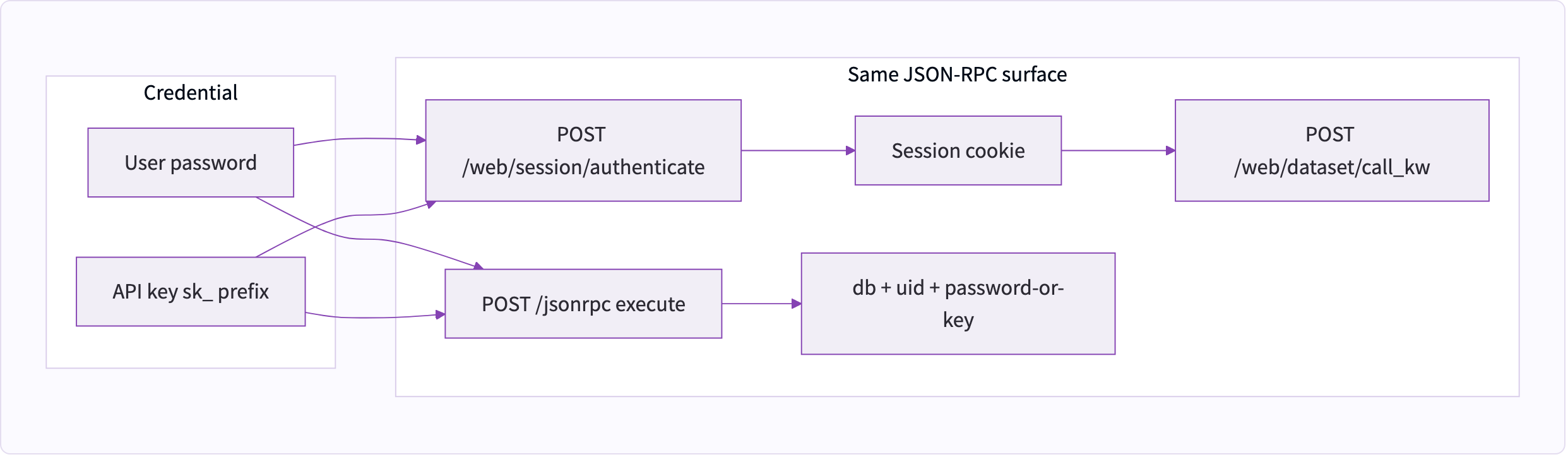
Password and session
CloudOffix uses session-based auth for the web dataset endpoints, and password-in-body auth for classic /jsonrpc.
1. Create a session
POST https://{{InstanceId}}/web/session/authenticate
{
  "jsonrpc": "2.0",
  "method": "call",
  "params": {
    "login": "{{Username}}",
    "password": "{{Password}}",
    "db": "{{InstanceId}}"
  },
  "id": 1
}
A successful result includes uid. If uid is false, the login failed. The response also sets a session cookie; send that cookie on later /web/session/* and /web/dataset/* calls.
Trimmed success payload:
{
  "jsonrpc": "2.0",
  "id": 1,
  "result": {
    "uid": 5079,
    "username": "integration.user@example.com",
    "name": "Integration User",
    "db": "yourcompany.cloudoffix.com",
    "company_id": 1,
    "partner_id": 5206,
    "session_id": "a2af0ec0399e82cbca42ccf0900aa65e43ab3607",
    "user_context": {
      "lang": "en_US",
      "tz": "UTC",
      "uid": 5079
    }
  }
}
Store result.uid as UserId for /jsonrpc calls. The Postman Authenticate request does this automatically.
2. Call /jsonrpc with password in the body
Classic object RPC does not use the session cookie. Each call repeats the database name, user id, and password:
{
  "jsonrpc": "2.0",
  "method": "call",
  "params": {
    "service": "object",
    "method": "execute",
    "args": [
      "{{InstanceId}}",
      "{{UserId}}",
      "{{Password}}",
      "res.partner",
      "search_read",
      [["name", "ilike", "john"]],
      ["name", "email"]
    ]
  },
  "id": 1
}
args are positional:
| Index | Value |
|---|---|
| 0 | Database name |
| 1 | User id (uid from authenticate) |
| 2 | Password or sk_… API key |
| 3 | Model technical name |
| 4 | Method name (search, read, create, …) |
| 5+ | Arguments for that method |
Prefer a dedicated integration user. Do not put an interactive user's password in a client — generate an API key for that user instead.
API key
A user API key is a secret that stands in for that user's password on JSON-RPC. It grants the same access rights as the user it belongs to. The raw secret starts with sk_ (32 random bytes as hex, 67 characters total). CloudOffix stores only a SHA-256 hash; the full key is shown once.
Create one:
- Settings → Technical → Security → API Keys (administrators only).
- Create a record, pick the integration user, optionally label it (for example
ERP integration). - Click Generate Key and copy
sk_…immediately. After you close the dialog it is masked assk_****************and cannot be revealed again. - Put the secret in the password field of authenticate /
/jsonrpcexecute. Revoke the key from the same screen if it leaks; a revoked key cannot be reactivated — generate a new one.
Authenticate with an API key
Same request as password login. password is the sk_… key, login is still the user's login.
POST https://{{InstanceId}}/web/session/authenticate
{
  "jsonrpc": "2.0",
  "method": "call",
  "params": {
    "login": "{{Username}}",
    "password": "{{ApiKey}}",
    "db": "{{InstanceId}}"
  },
  "id": 1
}
This works for integrations. It is rejected on the interactive browser form (/web/login, /web/signup, /web/reset_password).
Call /jsonrpc with the key as password
Same envelope as the password examples. Argument index 2 is {{ApiKey}} instead of {{Password}}. UserId must still be that key's user.
{
  "jsonrpc": "2.0",
  "method": "call",
  "params": {
    "service": "object",
    "method": "execute",
    "args": [
      "{{InstanceId}}",
      "{{UserId}}",
      "{{ApiKey}}",
      "res.partner",
      "search_read",
      [["name", "ilike", "john"]],
      ["name", "email"]
    ]
  },
  "id": 1
}
The rest of the ORM cookbook is identical: swap {{Password}} for {{ApiKey}}.
Protocol
JSON-RPC 2.0 over HTTPS. Always POST. Always Content-Type: application/json.
Request envelope:
{
  "jsonrpc": "2.0",
  "method": "call",
  "params": {},
  "id": 1
}
Success envelope:
{
  "jsonrpc": "2.0",
  "id": 1,
  "result": {}
}
On /jsonrpc, params.service is "object" and params.method is "execute" (positional) or "execute_kw" (positional args plus a kwargs dict). The third execute argument is the user password or an sk_… API key.
ORM cookbook
All examples below are POST https://{{InstanceId}}/jsonrpc with the password-in-body envelope. Swap the model name to work on any record type you can access.
fields_get
Returns the field catalog for a model. Use this as the source of truth for names, types, and required flags.
{
  "jsonrpc": "2.0",
  "method": "call",
  "params": {
    "service": "object",
    "method": "execute",
    "args": [
      "{{InstanceId}}",
      "{{UserId}}",
      "{{Password}}",
      "res.partner",
      "fields_get"
    ]
  },
  "id": 1
}
search
Returns matching ids only.
- Domain (required): filter, or
[]for all records the user can see offset(optional)limit(optional)order(optional), for example"create_date DESC"count(optional):truereturns an integer instead of ids
{
  "jsonrpc": "2.0",
  "method": "call",
  "params": {
    "service": "object",
    "method": "execute",
    "args": [
      "{{InstanceId}}",
      "{{UserId}}",
      "{{Password}}",
      "res.partner",
      "search",
      [["name", "ilike", "john"]],
      0,
      80,
      "id desc"
    ]
  },
  "id": 1
}{
"jsonrpc": "2.0",
"id": 1,
"result": [40, 16]
}Count only — last argument true:
{
  "jsonrpc": "2.0",
  "method": "call",
  "params": {
    "service": "object",
    "method": "execute",
    "args": [
      "{{InstanceId}}",
      "{{UserId}}",
      "{{Password}}",
      "res.partner",
      "search",
      [["name", "ilike", "john"]],
      0,
      0,
      "id desc",
      true
    ]
  },
  "id": 1
}{
"jsonrpc": "2.0",
"id": 1,
"result": 2
}read
Reads records by id. Second argument is the field list; [] returns all fields the user can see (large payloads — prefer an explicit list).
{
  "jsonrpc": "2.0",
  "method": "call",
  "params": {
    "service": "object",
    "method": "execute",
    "args": [
      "{{InstanceId}}",
      "{{UserId}}",
      "{{Password}}",
      "res.partner",
      "read",
      [1],
      ["id", "name", "email", "is_company"]
    ]
  },
  "id": 1
}{
"jsonrpc": "2.0",
"id": 1,
"result": [
{
"id": 1,
"name": "CloudOffix Inc.",
"email": "info@cloudoffix.com",
"is_company": true
}
]
}Many2one values arrive as [id, display_name]. Binary fields (image, …) arrive as base64 — omit them from fields unless you need them.
search_read
Search and read in one round trip.
- Domain
- Fields (optional;
[]= all) - Offset (optional)
- Limit (optional)
- Order (optional)
{
  "jsonrpc": "2.0",
  "method": "call",
  "params": {
    "service": "object",
    "method": "execute",
    "args": [
      "{{InstanceId}}",
      "{{UserId}}",
      "{{Password}}",
      "res.partner",
      "search_read",
      [["name", "ilike", "john"]],
      ["name", "email", "create_date"],
      0,
      10,
      "create_date DESC"
    ]
  },
  "id": 1
}{
"jsonrpc": "2.0",
"id": 1,
"result": [
{
"id": 40,
"name": "John Doe",
"email": "john.doe@example.com",
"create_date": "2020-09-11 06:59:03"
},
{
"id": 16,
"name": "John Farewell",
"email": "john.farewell@example.com",
"create_date": "2020-08-27 06:04:30"
}
]
}create
Pass a dictionary of field values. The result is the new record id.
{
  "jsonrpc": "2.0",
  "method": "call",
  "params": {
    "service": "object",
    "method": "execute",
    "args": [
      "{{InstanceId}}",
      "{{UserId}}",
      "{{Password}}",
      "res.partner",
      "create",
      {
        "name": "John Doe",
        "email": "john.doe@example.com"
      }
    ]
  },
  "id": 1
}{
"jsonrpc": "2.0",
"id": 1,
"result": 1307
}write
First argument is the id list, second is the values dict. Result is true.
{
  "jsonrpc": "2.0",
  "method": "call",
  "params": {
    "service": "object",
    "method": "execute",
    "args": [
      "{{InstanceId}}",
      "{{UserId}}",
      "{{Password}}",
      "res.partner",
      "write",
      [1307],
      {"email": "john.doe@example.com"}
    ]
  },
  "id": 1
}{
"jsonrpc": "2.0",
"id": 1,
"result": true
}unlink
Deletes the given ids. Result is true. This is permanent from the API's point of view — prefer archiving (write {"active": false}) when the model supports it.
{
  "jsonrpc": "2.0",
  "method": "call",
  "params": {
    "service": "object",
    "method": "execute",
    "args": [
      "{{InstanceId}}",
      "{{UserId}}",
      "{{Password}}",
      "res.partner",
      "unlink",
      [1307]
    ]
  },
  "id": 1
}
Search domains
Filters are lists in Polish (prefix) notation. A leaf is [field, operator, value]. Implicit operator between leaves is AND. Use '&', '|', '!' explicitly when you need them.
["&", ["name", "ilike", "john"], ["write_date", ">", "2021-01-01"]]means: name contains john and write_date is after 2021-01-01.
| Operator | Meaning |
|---|---|
= != | Equality |
in not in | Membership (value is a list) |
> >= < <= | Comparison |
like ilike | SQL LIKE / case-insensitive LIKE (% wildcards allowed) |
=like =ilike | Pattern match against the whole value |
Pagination: pass offset, limit, and order after the domain on search / search_read. order is an SQL-style clause such as "create_date DESC, id ASC".
Model map
Technical names are what you put in the model / execute slot. Call fields_get on a model before you write to it — installed apps change the field set per tenant.
| Product area | Model | Description |
|---|---|---|
| Contacts | res.partner | Companies, people, customers, vendors |
| CRM | crm.lead | Leads and opportunities |
| Project | project.project | Projects |
| Tasks | project.task | Tasks on a project |
| Employees | hr.employee | Employee records |
| Invoicing | account.invoice | Customer invoices and vendor bills |
| Products | product.product | Sellable products and services |
Web dataset (session)
These endpoints use the session cookie from authenticate. They do not repeat the password in the body. They are the same JSON-RPC 2.0 envelope, posted to a dedicated path.
Get session info
POST https://{{InstanceId}}/web/session/get_session_info
{
  "jsonrpc": "2.0",
  "method": "call",
  "params": {},
  "id": 1
}
Search and read
POST https://{{InstanceId}}/web/dataset/search_read
{
  "jsonrpc": "2.0",
  "method": "call",
  "params": {
    "model": "res.partner",
    "fields": ["name", "email"],
    "domain": [["name", "ilike", "john"]],
    "offset": 0,
    "limit": 10,
    "sort": "id desc"
  },
  "id": 1
}{
"jsonrpc": "2.0",
"id": 1,
"result": {
"length": 1,
"records": [
{
"id": 1307,
"name": "John Doe",
"email": "john.doe@example.com"
}
]
}
}Call any method
POST https://{{InstanceId}}/web/dataset/call_kw
{
  "jsonrpc": "2.0",
  "method": "call",
  "params": {
    "model": "res.partner",
    "method": "create",
    "args": [{"name": "New Contact"}],
    "kwargs": {}
  },
  "id": 1
}{
"jsonrpc": "2.0",
"id": 1,
"result": 1308
}Errors
Failures omit result and return an error object.
{
  "jsonrpc": "2.0",
  "id": 1,
  "error": {
    "code": 200,
    "message": "CloudOffix Server Error",
    "data": {
      "message": "Access Denied",
      "arguments": ["Access Denied"],
      "debug": "Traceback (most recent call last)..."
    }
  }
}| Situation | What you see |
|---|---|
| Bad login | Authenticate returns uid: false |
API key typed in /web/login | Login fails (uid: false) — keys are RPC-only |
Invalid or revoked sk_… key | Access denied / invalid API key |
| Missing rights | Access denied |
| Invalid values | A validation message naming the field |
| Unknown method | JSON-RPC error (see the Error Example request in Postman) |
Do not log data.debug in production clients — it can include a traceback.
Code samples
Replace placeholders. Never commit real passwords or keys.
curl — /jsonrpc password
curl -sS -X POST "https://${INSTANCE}/jsonrpc" \
  -H "Content-Type: application/json" \
  -d "{
    \"jsonrpc\": \"2.0\",
    \"method\": \"call\",
    \"id\": 1,
    \"params\": {
      \"service\": \"object\",
      \"method\": \"execute\",
      \"args\": [
        \"${INSTANCE}\",
        ${USER_ID},
        \"${PASSWORD}\",
        \"res.partner\",
        \"search_read\",
        [[\"name\", \"ilike\", \"john\"]],
        [\"name\", \"email\"]
      ]
    }
  }"
Python — /jsonrpc password
import os
import requests

instance = os.environ["CLOUDOFFIX_INSTANCE"]  # yourcompany.cloudoffix.com
uid = int(os.environ["CLOUDOFFIX_UID"])
password = os.environ["CLOUDOFFIX_PASSWORD"]

payload = {
    "jsonrpc": "2.0",
    "method": "call",
    "id": 1,
    "params": {
        "service": "object",
        "method": "execute",
        "args": [
            instance,
            uid,
            password,
            "res.partner",
            "search_read",
            [["name", "ilike", "john"]],
            ["name", "email"],
        ],
    },
}
response = requests.post(
    "https://{}/jsonrpc".format(instance),
    json=payload,
    timeout=30,
)
response.raise_for_status()
print(response.json()["result"])
curl — /jsonrpc API key as password
Same request as above. Set PASSWORD to the sk_… key (or pass it as a separate env var). USER_ID must be the user the key was generated for.
curl -sS -X POST "https://${INSTANCE}/jsonrpc" \
  -H "Content-Type: application/json" \
  -d "{
    \"jsonrpc\": \"2.0\",
    \"method\": \"call\",
    \"id\": 1,
    \"params\": {
      \"service\": \"object\",
      \"method\": \"execute\",
      \"args\": [
        \"${INSTANCE}\",
        ${USER_ID},
        \"${API_KEY}\",
        \"res.partner\",
        \"search_read\",
        [[\"name\", \"ilike\", \"john\"]],
        [\"name\", \"email\"]
      ]
    }
  }"
Python — /jsonrpc API key as password
import os
import requests

instance = os.environ["CLOUDOFFIX_INSTANCE"]
uid = int(os.environ["CLOUDOFFIX_UID"])
api_key = os.environ["CLOUDOFFIX_API_KEY"]  # sk_…

payload = {
    "jsonrpc": "2.0",
    "method": "call",
    "id": 1,
    "params": {
        "service": "object",
        "method": "execute",
        "args": [
            instance,
            uid,
            api_key,
            "res.partner",
            "search_read",
            [["name", "ilike", "john"]],
            ["name", "email"],
        ],
    },
}
response = requests.post(
    "https://{}/jsonrpc".format(instance),
    json=payload,
    timeout=30,
)
response.raise_for_status()
print(response.json()["result"])
Postman
Download from GitLab:
| File | Role |
|---|---|
| CloudOffix API.postman_collection.json | Requests, folders, example responses |
| CloudOffix API.postman_environment.json | Variable placeholders |
- In Postman: Import both files.
- Select the CloudOffix API environment.
- Fill
InstanceId,Username, and eitherPasswordorApiKey(sk_…from Settings → Technical → Security → API Keys). Leave secrets out of git — the environment file in this repo is empty on purpose. - Run Authenticate (password) or Authenticate (API key). The test script writes
uidintoUserId. - Run JSON-RPC requests. Password-folder requests use
{{Password}}; API-key-folder requests use{{ApiKey}}in the same slot.
Folders:
- Authentication — password / session — login and session info
- JSON-RPC — password in body —
search,read,create, … - Web dataset — session cookie —
/web/dataset/search_read,call_kw - JSON-RPC — API key as password — same calls with
{{ApiKey}}(sk_…)
Security
- Use a dedicated integration user with the minimum access rights the client needs. Do not share an interactive employee login.
- Prefer an API key (
sk_…) over the user's password in clients. Treat it like a password: store it in a secret manager, rotate it, revoke it when the integration is retired. - Never commit
PasswordorApiKeyvalues. The environment file in this repository is a template. - Always use HTTPS. Session cookies and the password/key slot in
/jsonrpcbodies are credentials. - Keys are shown once at creation. If you lose the secret, generate a new key and revoke the old one. Revoked keys cannot be reactivated.
- Do not paste an API key into
/web/login. It will be rejected. - Access control is the same as the UI: a key or password can only do what that user is allowed to do on that model.