
Overview: WhatsApp integration has been simplified by removing third-party dependencies and enabling a direct connection. This update provides a more stable, native, and streamlined WhatsApp experience inside CloudOffix.
Updates:
1. New Direct WhatsApp Integration via Meta:
- WhatsApp is now connected directly without using an intermediary service.
Benefits:
More Stable Messaging: Direct integration reduces failures and dependency-related issu
Simpler Architecture: Fewer moving parts mean easier maintenance and better reliability.
Lower Operational Overhead: No need to create separate accounts, manage credits, or rely on third-party setups.
How it works?
- WhatsApp is connected directly through Meta, enabling native WhatsApp Business messaging without third-party providers.
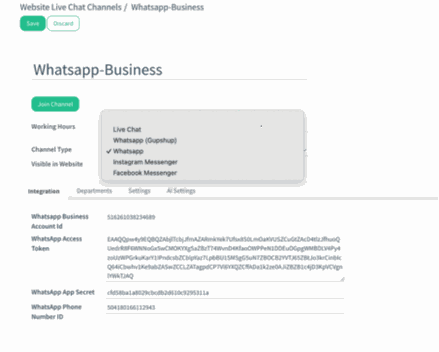
- When creating a live chat channel, the Channel Type must be set to WhatsApp (direct) instead of WhatsApp (Gupshup) to activate the native Meta integration.
- After selecting WhatsApp as the channel type, the admin completes the integration by providing the WhatsApp Business Account ID, access token, app secret, and phone number ID obtained from Meta.
%20(15).png?access_token=3b406f41-6b22-4df5-a465-30f9b44177ff)
- Once connected, the channel can be assigned to specific departments and configured with working hours and visibility rules.