-
Çözümler
- Front OffIce Apps
- Connect Your Systems
- BuIlders & AutomatIon
- AI CapabIlItIes
-
Sektörler
- By Industry
- By Roles
- Cloudia AI
-
Resources
- Destek Masası
- Learn
- Discover
-
Partners
- Grow With Us
- Partner Positioning
- Hakkımızda
Overview: CloudOffix now supports the creation of independent Connect meeting links through the Quick Create option, providing more flexibility when organizing meetings outside of the standard calendar setup.
Updates:
1. Quick Create Connect Link:
Users can create a CloudOffix Connect meeting link directly from the Quick Create option, bypassing the need to schedule through the calendar.
Benefits:
Faster Meeting Setup: Provides a faster way to create and share meeting links, especially for impromptu discussions.
Increased Flexibility: Offers more flexibility in scheduling, allowing users to create meeting links independently of calendar events.
How it works ?
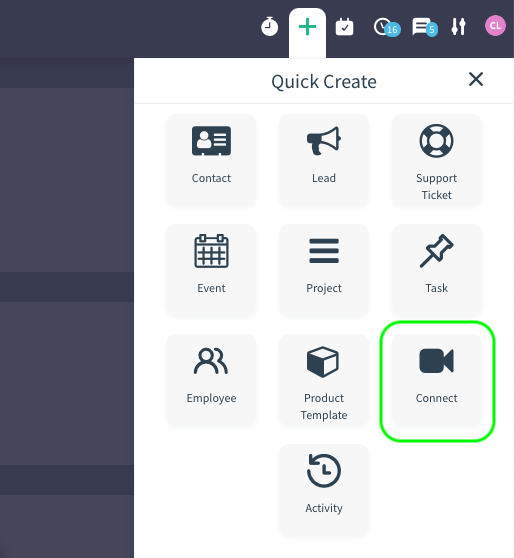
- Click on plus (+) button on app drawer.
- Then, click Connect button.
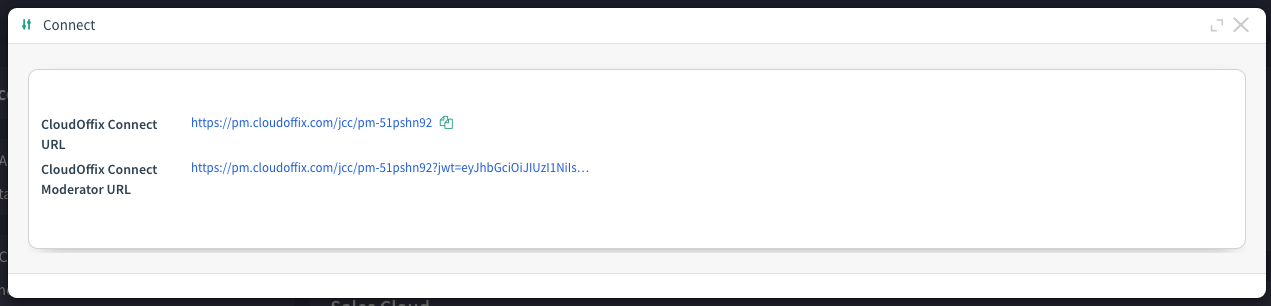
- In the opening pop-up, you can start or join Connect meeting by using the links.